Comprehensive Microsoft Word templates repository to download hundreds of free word templates, including resume, calendar, invoice, receipt, agenda, letter, form and many other templates.
Pay stubs play a crucial role in financial management for both employers and employees. They bring clarity to every payday by showing how earnings were calculated, what deductions were taken, and the final net amount received. With a clear breakdown of transactions, both parties can better track income, taxes, and contributions.
Whether you’re an employer seeking to improve payroll processes or an employee wanting to understand paycheck details, this guide covers everything you need to know about pay stubs.
What Is a Pay Stub?
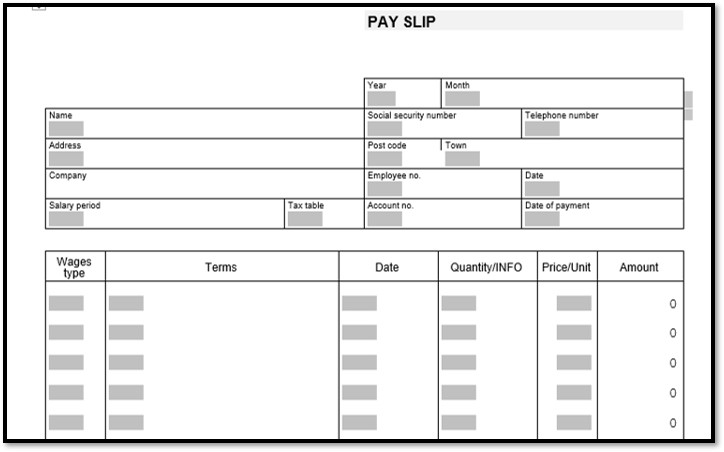
A pay stub is an official document that outlines an employee’s compensation for a specific pay period. It usually includes:
Total hours worked
Gross earnings
Deductions (taxes, benefits, etc.)
Net pay
Additional details such as PTO balances, sick leave, or job-specific information
Pay stubs are issued alongside or shortly after a paycheck and act as a verified record of payment. They’re especially useful for tracking year-round income, verifying tax-related information, and helping employees manage their personal finances more effectively.
Employers also rely on these records to track benefits, retirement contributions, and payroll accuracy.
Employee Benefits of Using a Pay Stub Template
A well-designed pay stub template benefits both sides of the payroll process:
For Employers
Ensures accurate documentation to prevent payroll disputes
Creates a reliable audit trail
Reduces the risk of legal issues related to pay discrepancies
Simplifies recordkeeping for tax reporting, benefits, and compliance
For Employees
Offers clear proof of wages received
Helps monitor income, deductions, and benefits
Makes it easier to budget and verify payments
Provides documentation for loans, rentals, or financial applications
Organized and consistent pay stubs enhance transparency and make payroll management much smoother.
Why Use a Pay Stub Template?
A pay stub template streamlines the payroll process and ensures information is always presented clearly and consistently.
Benefits for Employers
Saves time and effort on manual calculations
Reduces mistakes through automated formula fields
Allows full customization based on company policies, tax structures, and branding
Benefits for Employees
Ensures accuracy with every payment
Supports tracking of year-to-date totals
Helps identify discrepancies between expected and actual pay
Key Information Included in a Pay Stub
A complete pay stub contains several categories of employee and payroll data, including:
1. Earnings & Deductions
Details for the current pay period, such as:
Hourly or salary earnings
Overtime
Commission or bonuses
Taxes and benefits deductions
2. Employer Contributions
This section lists contributions made by the employer, such as:
Retirement funds
Health insurance
Other benefits
3. Year-to-Date (YTD) Totals
Summaries of:
Income earned
Taxes withheld
Benefit contributions
4. Direct Deposit Information
For those using direct deposit, payment confirmation and banking details are included.
Types of Pay Stub Templates
Employers can choose from several types of templates depending on their payroll schedule and reporting needs:
1. Year-End Pay Stubs
Summarize all income and deductions for the full calendar year—useful for tax filing and annual statements.
2. Weekly Pay Stubs
Issued weekly with details on:
Hours worked
Gross pay
Taxes
Net pay
PTO, overtime, or bonuses
3. Biweekly Pay Stubs
Prepared every two weeks. Often include both pay-period and year-to-date totals.
Choosing the right type ensures accurate tracking and simplifies the payroll process.
How to Create Your Own Pay Stub Template
Developing a custom pay stub—whether from scratch or using a free template—requires just a few steps:
Gather Employee Info Include names, addresses, tax IDs, pay rate, and deduction details.
Enter Data Into the Template Input wages, hours worked, deductions, and employer contributions.
Customize the Layout Add business logos, adjust formatting, and set up fields for recurring pay periods.
Finalize and Distribute Provide pay stubs digitally or print physical copies for employees.
Using templates not only saves time but also increases accuracy across all payroll records.
Tips for Choosing the Best Pay Stub Template
When selecting a template that fits your business, consider the following:
✔ Customization Options
Choose a template that allows logo placement, editable fields, tax configurations, and flexible formatting.
✔ Clean and Easy-to-Read Layout
Employees should be able to find key information at a glance.
✔ Payroll System Integration
Compatibility with accounting or payroll software reduces manual work and errors.
✔ User-Friendly Interface
A simple, intuitive design helps you generate consistent pay stubs quickly.
Get Paid Faster With Digital Pay Stubs
Digital pay stubs offer instant access to payroll information without waiting for physical documents. They’re secure, convenient, and accessible from any device.
Advantages of Digital Pay Stubs
No risk of losing or damaging paper records
Immediate access to payment history
Easy tracking of deductions such as:
Federal & state taxes
Social Security (FICA)
Medicare
Retirement contributions
Health insurance premiums
Electronic storage for future reference or filing
Digital pay stubs simplify payroll and ensure employees always have accurate payment records at their fingertips.
Additional Considerations for Employers
Before implementing a pay stub template, keep these tips in mind:
Include optional deductions if applicable (insurance, 401(k), etc.)
Maintain a clear, employee-friendly layout
Ensure taxes and withholding amounts are calculated correctly
Update templates whenever payroll laws change
Regularly audit employee pay stubs to ensure accuracy
Account for special payment types like tips, commissions, or bonuses
Proper attention to these factors helps prevent payroll errors and ensures compliance with federal and state regulations.
Conclusion
Pay stub templates offer a simple, organized, and efficient way to manage payroll. They help businesses avoid costly mistakes, maintain accurate financial records, and provide employees with confidence in their compensation.
By using the right template, companies can streamline payroll operations, reduce administrative work, and improve overall transparency. For employees, pay stubs act as a reliable record of income and deductions—essential for budgeting, tax preparation, and financial planning.